Reports & Other Functionality
Using the Disclosure Report
The Disclosure Report summarizes your lease accounting balances and movements over a period, in a format that supports IFRS 16 and ASC 842/US GAAP disclosure requirements. It pulls information from your Right‑of‑use (ROU) asset schedules, Lease liability schedules, and Payment schedules. Because of this, please make sure your leases are at least in the Workflow Status “Schedules Created.” Using these schedules, it creates:
Expense Analysis
Cash Flow Analysis
Right‑of‑Use Asset Analysis
Lease Liability Analysis
Running the Report
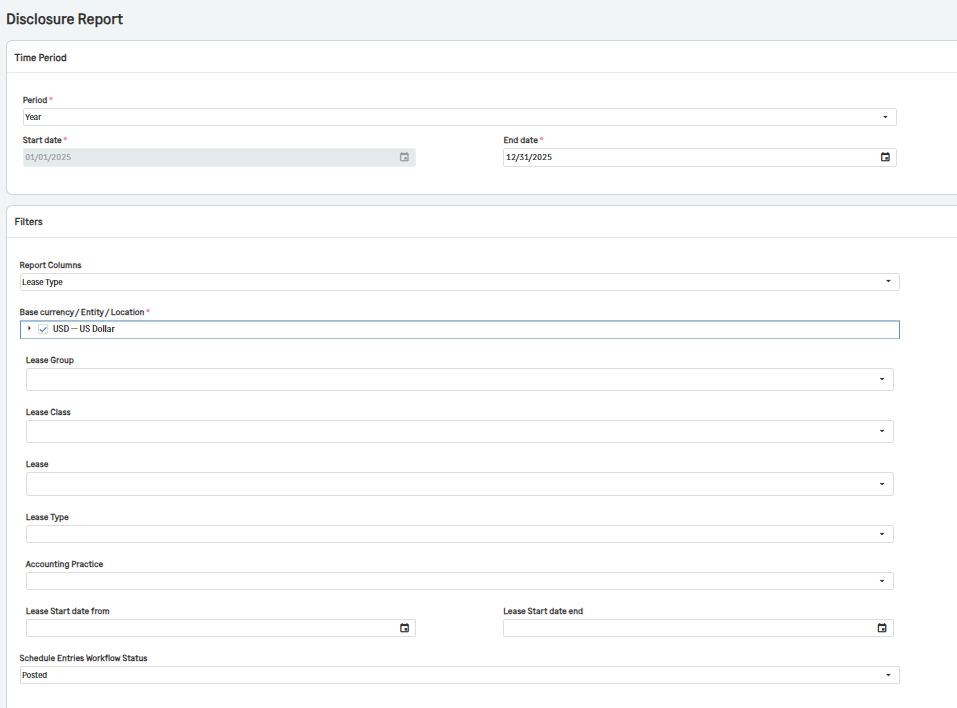
In the Lease Accounting menu, go to Disclosure Report.
Fill out the Time Period for the report
If you would like to run this lease for a single month period, select Month and enter the last day of the month in the End date field.
If you would like to run this lease for a quarter period, select Quarter and enter the last day of the quarter in the End date field.
If you would like to run this lease for a year, select Year and enter the last day of the year in the End date field.
If the time period you would like to run the report for does not fit any other category, select Custom and enter the Start Date and End Date of the reporting period.
2. Fill out the Filters for the report
Choose how you would like your report to be separated in the Report Columns dropdown.
Lease Type: Use this when you only need disclosure by lease type (finance vs operating).
Lease Type and Lease Class: Use this when your disclosures require more granular breakdown by lease classes within each lease type.
Base currency/Entity/Location
Select the appropriate filters for your report. This is required.
Note A: If you are running this report at the top level, the following options show values from all entities. If you are at the entity level, the options are limited to that entity’s locations.
Note B: Some of these options such as Base Currency or Entity are only visible depending on your company configuration. For example, Base Currency is only visible if multi-currency is enabled and you are running the report at the top level.
If you would like to filter your report for a specific Lease Group, select it in the dropdown
If you would like to filter your report for a specific Lease Class, select it in the dropdown
If you would like to filter your report for a specific Lease, select it in the dropdowns
If you would like to filter your report for a specific Lease Type, select it in the dropdown
If you would like to filter your report for a specific Accounting Practice, select it in the dropdown
If you would like to filter your report so that it only includes leases that have a specific Start date, enter the time period in the Lease Start date from field and Lease Start date end.
You can also use the Schedule Entries Workflow Status field to filter for Posted or Posted and Created Schedule entries.
3. Click View.
Note: Each filter is optional unless required by your internal policy. Leaving a filter blank means “all values” for that dimension.
Understanding the Disclosure Report
Now that you have created your report, you can now view the different analyses included on your report. They are as follows:
Expense Analysis
Cash Flow Analysis
Right-of-Use Asset Analysis
Lease Liability Analysis
Below is the detailed explanation of each line:
Expense Analysis
1.1 Amortization of Right‑of‑Use Assets
What it shows: Total RoU Depreciation Expense for the period.
Source: RoU Asset Schedules (RoU Depreciation amounts) based on your workflow status selection.
Purpose: Discloses the period’s depreciation of right‑of‑use assets.
1.2 Interest on Lease Liabilities
What it shows: Total interest expense on lease liabilities for the period.
Source: Lease Liability Schedules (Interest amounts) based on your workflow status selection.
Purpose: Discloses the interest component of lease payments.
1.3 Expenses not included in Lease Liabilities
What it shows: Lease‑related expenses that are not capitalized as part of lease liabilities (e.g., certain variable or non‑lease components depending on configuration).
Source: Payment Schedules (Expense Amount) based on your workflow status selection.
Purpose: Supports the required disclosure of lease‑related expenses not included in the measurement of lease liabilities.
1.4 Total Lease Expense
What it shows: Sum of Amortization of RoU assets, Interest on lease liabilities, Expenses not included in lease liabilities
Purpose: Gives the total lease‑related expense recognized in the period.
Cash Flow Analysis
2.1 Financing Cash Flows
What it shows: Cash outflows related to finance leases, typically classified as financing activities.
Purpose: Supports disclosure of lease‑related cash flows classified as financing.
2.2 Operating Cash Flows
What it shows: Cash outflows related to operating leases, typically classified as operating activities.
Purpose: Supports disclosure of lease‑related cash flows classified as operating.
2.3 Total Cash Flows
What it shows: Sum of Financing Cash Flows and Operating Cash Flows
Purpose: Shows total lease‑related cash outflows for the period.
Right‑of‑Use Asset Analysis
3.1 Right‑of‑Use Assets
What it shows: Closing balance of right‑of‑use assets as of the End Date.
Source: ROU Asset Schedules – last schedule record at the reporting Ending Date (Closing Balance) for each lease.
Purpose: Provides the period‑end ROU asset balance for disclosure.
3.2 Additions, in period
What it shows: New ROU asset additions (new leases) starting during the reporting period.
Source: RoU Asset Schedules – first schedule record for leases whose start date falls within the reporting period (Opening Balance).
Purpose: Supports disclosure of additions to right‑of‑use assets during the period.
Lease Liability Analysis
4.1 Weighted Average Remaining Lease Term (in Years)
What it shows: The weighted average of the remaining lease terms (in years), weighted by the closing lease liability balance for each lease as of the End Date.
Purpose: Required disclosure of average remaining term of leases.
4.2 Weighted Average Discount Rate (Percentage)
What it shows: The weighted average discount rate applied to leases, weighted by the closing lease liability balance as of the End Date.
Purpose: Required disclosure of the average discount rate used in measuring lease liabilities.
4.3 & 4.4 Future Maturity of Lease Liabilities
What it shows: For each year after the End Date, the total future lease payments due in that year.
Source: Payment Schedules with Schedule Date > End Date, grouped by year after the End Date.
Purpose: Provides the maturity analysis of lease liabilities (undiscounted lease payments) as required by IFRS 16 / ASC 842.
4.5 Future Lease Payments
What it shows: Sum of all the yearly maturity amounts in 4.4 (the total undiscounted future lease payments).
Purpose: Summarizes the total of all future lease payments after the reporting date.
4.6 Present Value Discount
What it shows: The difference between the present value of future lease payments, and total undiscounted future lease payments.
Interpretation: This represents the cumulative discount (time value of money) between the undiscounted cash flows and their present value as recognized in the lease liabilities.
4.7 Present Value of Future Lease Payments
What it shows: The total lease liability balance as of the End Date – effectively the present value of future lease payments.
Source: Lease Liability Schedules – last closing balance at the reporting End Date for each lease.
Purpose: Ties directly to the lease liability presented on the balance sheet.
4.8 Lease Liabilities, Current Portion
What it shows: The current portion of lease liabilities (amount expected to be paid within the next year) as of the End Date.
Source: Lease Liability Schedules – last Current Lease Liability amount at the End Date.
Purpose: Supports classification of lease liabilities between current and non‑current.
4.9 Lease Liabilities, Non‑Current Portion
What it shows: The non‑current portion of lease liabilities (amount expected to be paid after one year) as of the End Date.
Source: Lease Liability Schedules – last Non‑Current Lease Liability amount at the End Date.
Purpose: Completes the split of lease liabilities into current and non‑current.
4.10 Total Lease Liabilities
What it shows: Sum of Lease Liabilities, Current Portion and Non‑Current Portion
Purpose: This total should align with the present value of future lease payments, reconciling your balance sheet lease liability to the maturity table and discount.
Viewing the Disclosure Report
There are various ways to view the report. Here are the options you have with the toolbar:
Skip to the first page
Go to the previous page
Select which page to go to in the dropdown
Go to the next page
Skip to the last page
Toggle between multiple page screen or single page
Zoom Out
Select Zoom Percentage
Zoom In
Send to printer
Send to PDF
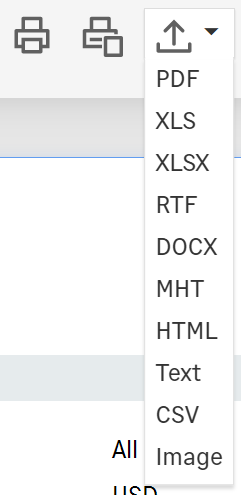
Export to PDF, Excel, .RTF, Word, .MHT, HTML, Text, CSV, or Image
Search for key words or numbers
Make window full screen