
Sage Intacct Fixed Assets Release Notes
Fixed Assets Release V8.5
November 6, 2024 | Product: Sage Intacct Fixed Assets
DESCRIPTION
Sage Intacct has released version 8.5 of our Fixed Assets (FA) module. FA Implementation, Setup and User procedures have changed and updated Setup and User Guides are included with the release.
RELEASE NOTES
New features:
Diminishing Balance Depreciation
Diminishing Balance Depreciation (a.k.a. “Reducing Balance” or “Declining Balance”) calculations are now supported by IFRS and Tax Requirements of the UK, Canada, Australia, et al.). Depreciation is calculated per Fiscal or Calendar Year and spread over the periods of the convention (i.e., Year, Quarters, or Months).
Sum of Years Digits Depreciation
The Sum of Years Digits Depreciation method is now supported. Depreciation is calculated per Fiscal Year and spread over the periods of the convention (i.e. Year, Quarters, or Months).
MACRS and DBB Depreciation per Month
MACRS and Double-Declining (DBB) Depreciation Methods of the United States Internal Revenue Service (IRS) can now be calculated per tax requirements, but in Financial Books, spread over the periods of the convention (i.e., Year, Quarters, or Months).
Additional Depreciation Variables
To support the above-mentioned calculations, additional variables are available to create custom Depreciation Methods:
o CYNB (Calendar year opening net book value)
o CYP (Current age in periods of convention, e.g. months, years, or quarters within the calendar, year)
o CYRP (Remaining number of periods of convention, e.g. months, years, or quarters within the calendar year)
o CYD (Year-to-Date sum of depreciation amount)
o CYY (current age in years, rounded up to the nearest 1)
o CYR (remaining life in years, rounded up to the nearest 1)
o CYNP (no of periods in this year)
o CYSD (calendar year sum of digits)
o FYNB (net book value)
o FYP (current age in periods of convention, e.g., months, years, or quarters within the fiscal year)
o FYRP (remaining number of periods of convention, e.g. months, years, or quarters within the fiscal year)
o FYD (Year-to-date sum of depreciation amount)
o FYY (current age in fiscal years, rounded up to the nearest 1)
o FYR (remaining life in fiscal years, rounded up to the nearest 1)
o FYNP (no of periods in this fiscal year)
o FYSD (fiscal year sum of digits)
o PY (periods in fiscal current year)
Depreciation to a Minimum Book Value
To allow infinite calculations, such as Declining Balance to provide finite Depreciation Schedule entries, a Minimum Value field has been added to the Book Detail setup. When Depreciation Schedules are calculated, and it is detected that further depreciation entries would let the Net Book Value of the asset fall below the Minimum value, the current Net Book Value of the asset is depreciated, and no further Depreciation entries are produced.
Self-provisioning
Partners and Professional Services now have the ability to self-provision Fixed Assets and also reset the XML Gateway User after copy companies or Sandbox refreshes.
Help Center
A centralized area where all Fixed Asset documentation can be accessed is now available.
Information Messages
Users of Fixed Assets v5.0 and higher are notified in the User Interface when System Maintenance may be advisable, e.g., Upgrades are available.
Improvements:
Tooltip Help for Roll Forward Report: The Roll Forward Report’s runtime parameter screen now has tooltip help for every prompt.
Action UI: All Fixed Assets pages now default to the Action UI for all users, irrespective of their individual settings.
Depreciation Reference: A reference is now available against Depreciation Schedules that can be populated in General Ledger Entries.
Audit trail for Depreciation Before: An audit trail is now available for the Depreciation Before field against the Asset master.
Bug Fixes:
GL Code or Dimension Cloning: no longer updates attached Fixed Assets data.
Roll Forward Report: Logic changes for further performance and stability improvements were made.
Validation Rules: The Validation engine now only checks for the existence of Item dimension values when the Item dimension is in use and required.
KNOWN ISSUES
N/A
APPLIES TO
The release applies to all Intacct Companies running Sage Intacct Fixed Assets.
PREREQUISITES AND DEPENDENCIES
Sage Intacct Fixed Assets is licensed for your Intacct Company.
ACTIONS
FA V8.5 is not automatically applied to existing customer environments.
While the Technical Solutions Group does not consider FA V8.5 to be a mandatory upgrade, customers are strongly encouraged to upgrade from earlier releases to take advantage of the latest application bug fixes and improvements.
Please consult the Sage Intacct TSG Fixed Assets Upgrades section below for details of the content of historical Fixed Assets releases. This provides important information to assist customers with the decision to upgrade from an existing version of Fixed Assets to the latest version. It also explains any approvals that must be supplied by the customer authorizing system upgrade changes.
New Fixed Assets installations must use the Sage Intacct TSG Fixed Assets V8.5 setup files available in the Help Center. The latest version of the Sage Intacct TSG Fixed Assets User Guide is also available in the Help Center.
Description
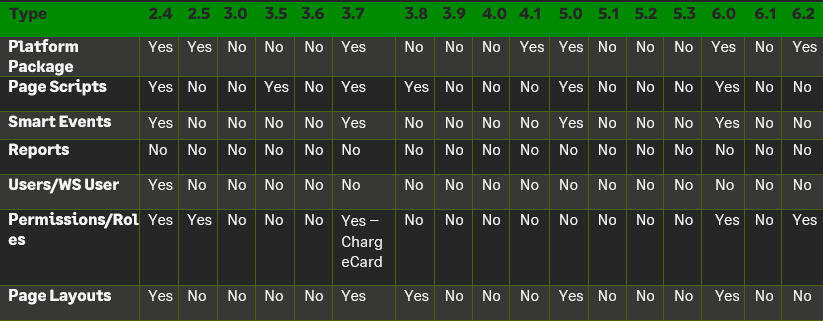
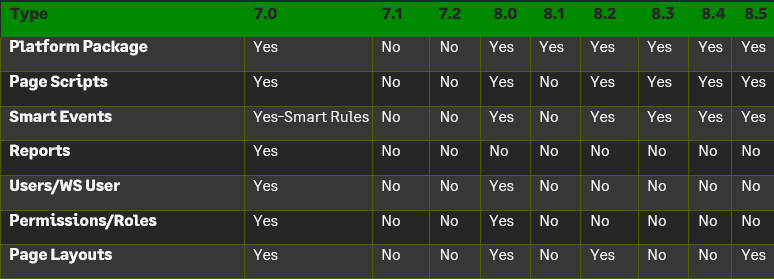
The following provides information about changes to Sage Intacct TSG Fixed Assets from release to release. Release information is presented in descending order, with release notes for the most recent release at the top of the page. Please refer to the version that is currently installed in your environment to determine what improvements and or changes will be applied to your Intacct Company. For example, if your current version is 2.4 and the upgrade is to version 8.5, then the impact on your company will be all changes and features from V2.4 to V8.5.
The current version can be determined by logging in to Intacct, navigating to Platform Services → Platform Tools → Applications, and taking note of the Version number assigned to the Fixed Assets application.
Fixed Assets Release V8.4
RELEASE NOTES
New features:
Non-depreciating Assets
Asset Classes can now be created for Non-depreciating Assets, e.g., Land.
Bonus Depreciation for USA/IRS
Depreciation Methods and Book Details to accommodate Bonus Depreciation as allowed by the IRS in the USA have been added to the application.
Performance of Roll Forward Report
The performance of the Fixed Asset Roll Forward Report has been significantly improved by the implementation of a data caching mechanism.
Roll Forward Report on Tax Books
The Fixed Asset Roll Forward Report has been updated to allow the report to be produced for a user-defined selection of Tax Books, as opposed to only for Financial Books.
Prompts for Roll Forward Report
Additional report prompts have been added for the Fixed Asset Roll Forward Report to allow users greater freedom in the layout of the report output. Report prompts also load quicker than before.
Updating Accumulated Depreciation
The process of updating the Accumulated Depreciation on Assets after Depreciation Posting has been updated to improve system reliability and performance.
Duplication of Asset Class on Depreciation Schedules
The process of updating the Financial Depreciation Records on Assets after Depreciation Posting has been updated to improve system reliability.
CIP Write to Expense Dimensions
The CIP Write to Expense function has been improved to include all relevant Dimension values in its posting to the General Ledger.
Change Asset Attributes and Partial Disposal Failures
The transaction Processing logic of Change Asset Attributes and Partial Disposal functions has been updated to reduce transaction failures.
Deletion of Depreciation Schedules
Additional system controls have been implemented to eliminate the accidental deletion of Depreciation Schedules.
Currency on Split Assets
When an Asset is Split, the split Assets now inherit the Currency from their Source Asset.
Special Characters
Assets with special characters in their name were unable to be Disposed, Partially Disposed, or have the Change Asset Attributes function performed against them.
KNOWN ISSUES
N/A
Fixed Assets Release V8.3
RELEASE NOTES
New features:
Validation Rules Engine
Optimizations and Improvements to the Fixed Assets Validation Rules Engine.
Vendor Dimension
The Vendor dimension now is passed on to Fixed Assets created from Credit Card Transactions.
Dimension Terminology
The Fixed Asset module now functions properly when standard Dimensions in Intacct are renamed.
Fixed Assets Release V8.2
RELEASE NOTES
New features:
Depreciation Calculation
The ability to prorate depreciation charged to individual financial periods by the number of days in that period, has been added.
Depreciation Calculation
An additional Straight-Line formula has been shipped to be used with Prorated depreciation (above).
User Interface Improvements
A new header feature has been added to the View Asset tab and Asset Actions have been converted into Workflow Actions. Note: These features are only available to users who have the Action UI enabled for both Custom and customized pages, and Platform and Customization Services
Smart Events
Timeout settings for Fixed Asset Smart Events on AP Bills and Credit Card Transactions have been extended to the maximum to reduce timeouts.
Split Assets
Feature had been optimized for use with large numbers of dimensions and splits.
Asset Class
Can no longer delete an Asset Class if it is in use on any Assets.
Reporting
Timeouts experienced when running reports on large datasets have been eliminated.
Fixed Assets Release V8.1
RELEASE NOTES
New features:
Provisioning
The ability to map Fixed Asset (FA) fields to the General Ledger (GL), or from Accounts Payable (AP) Bill to FA to GL, is now available as part of Provisioning.
Provisioning
A Search Box has been added for the Company ID and Tenant columns.
Provisioning
The Provisioning tool now includes the ability to show the version of FA is deployed in an Intacct instance.
Asset Split
FA users are now presented with additional fields when splitting an Asset.
Construction in Progress (CIP)
Department and Class added to the Posting of CIP Assets to General Ledger.
Tax Books
A Tax Book is attached to an Asset Class in the Top Level and Entities irrespective of where it had been created.
Asset Class
When an Asset has the Status of “To Review” and its Asset Class is changed, it is now changed for the Tax Depreciation Book as well.
Save and Synchronize
An attempt to Save and Synchronize Platform Service Pages no longer corrupt Fixed Asset Screens.
Asset Transfers
The FA application failed when transferring an asset where the names of Asset Books were not unique.
Asset Split
Document Attachments are no longer inherited by split Assets.
User-Defined Dimensions
FA Validation Rules now fail when a required User-Defined Dimension value is not populated.
Summary Depreciation
When Posting Depreciation in Summary, an error no longer occurs when posting a Batch.
Summary Depreciation
Posting Depreciation in Summary in multiple Entities in parallel, no longer result in an error message being shown.
Deprecation Posting
Renaming the label of a Dimension in the Asset Class object no longer result in Dimension values not being populated in the GL.
Deprecation Posting
Multiple clicks of the posting of Depreciation no longer result in posted Depreciation Schedules being shown in an Error status.
Depreciation Schedules
When importing Assets where the remaining Depreciation is less than the Accumulated Depreciation, the last Depreciation Schedules are now created.
Change Asset Attributes
Changing Asset Attributes no longer result in an error when no Tax Books are defined for an Asset.
Application Performance
Database management improvements performed.
Fixed Assets Release V8.0
RELEASE NOTES
New features:
Depreciation Posting
The Fixed Assets (FA) application will now provide a user-option to create a summarized GL batch with an on-demand status tracker for depreciation postings.
Asset Dimension Transfer
FA users can now record the transfer of funds for all the standard and user-defined dimensions, including allocations, in the General Ledger (GL) with audit trail and history.
Transaction Allocations
Allocate fixed assets without the need for manual journal entries. Fixed asset transaction allocations automatically split amounts across dimensions according to user- defined allocation rules.
Construction in Progress (CIP)
Allocate the total budget to a project and compare that to the CIP items accumulated over time before it is capitalized.
Last Inventoried Date for Assets
Update the date of the last inventory and/or condition of a particular asset or all assets at a particular location throughout its lifecycle.
Partial Asset Disposal
The FA application failed to process partial disposal for a completely deprecated asset. This issue is now fixed.
Tax Depreciation
Assets with MACRS tax depreciation method, ‘half’ conventions, and fiscal periods generated incorrect tax depreciation schedules. This issue is now fixed.
Warranty, Service, and Insurance Details
The FA application failed to send email notifications to all the recipients who opted to receive an email for reminders related to asset warranty, service, and insurance. This issue is now fixed.
Fixed Assets Release V7.2
RELEASE NOTES
New features:
The Fixed Assets (FA) application now interoperates correctly with the native VAT solution for assets created from the credit card (CC) transactions. The application incorrectly created two assets from a credit card line item – one for the line item’s amount and another for its tax amount. This issue is now fixed. FA users will now be able to include/exclude, as needed, reclaimable tax amount from the asset acquisition cost for assets created from CC transactions within an entity in a VAT jurisdiction.
The application displayed the ‘Is CIP’ field in addition to ‘Is Asset’ on the AP Bill line item, even though the GL account was related to an Asset. This issue is now fixed.
The title of the Change Asset Attributes and Disposal pages was truncated in the action UI. This issue is now fixed.
The Excel sheet generated from the Roll Forward report could not be opened from the browser. Additionally, the static columns in the report occupied a majority of the screen. Both issues are now fixed.
Fixed Assets Release V7.1
RELEASE NOTES
New features:
FA Roll Forward Report (RFR)
The application parsed the dates incorrectly when the RFR was requested for Sage Intacct companies that had a different company and user setup time zone. The report was generated one day before the date range provided by the user. This issue is now fixed.
The summary version of the RFR displayed the subtotals (the last row of the report) incorrectly. This issue is now fixed.
The Company Name in the RFR was displayed as ‘Sage Intacct’ instead of the customer’s company name. This issue is now fixed.
The application provides the RFR with frozen/static column headers for better readability.
Change Asset Attributes (CAA)
Upon creation of an Asset Class via the CAA workflow, the application swapped the Accumulated Depreciation GL Account with the Depreciation Expense GL Account. This issue is now fixed.
Split Asset
The application did not display the Physical Location of the Asset on the Split Asset workflow. This issue is now fixed.
Fixed Assets Release V7.0
RELEASE NOTES
New features:
Asset Physical Locations
Assign a physical location to an asset to identify important links in the office, storage, or physical spaces of any kind to streamline business operations. See a map view of the assigned asset's physical location to get a quick, pictorial view.
Change Depreciation Method for an In-Service Asset
Change the depreciation method of an in- service asset by either re-generating remaining or all depreciation schedules. Review the complete audit trail and history for tracking purposes.
Construction in Progress (CIP)
Accumulate and record the cost of capital work in progress. Create CIP Items automatically from AP Bills, Purchasing, and Credit Card Integration, Assets and capitalize them once the project is completed. Upon completion, capitalize and depreciate the asset after review.
Roll Forward Report
Access the Roll Forward report from within the FA application and review the asset information for all the standard and user-defined dimensions in the order as desired. Have on-demand access to FA logs to see information on when the report was requested, who requested it, and if the request was successfully processed.
Application Enablement
The option to deactivate the FA application has been renamed to ‘Deactivate’ from ‘Inactivate’.
Application Components
FA’s menu components have been sorted to be displayed in alphabetical order.
Purchasing Transactions enabled for FA
The application opened the ‘Show Details’ section automatically when a purchasing transaction enabled for FA was created/edited by a user. This behavior has been modified in the application to not open the ‘Show Details’ section automatically unless it is clicked by the user.
Financial Depreciation Forecast Report
The application now ships with a financial depreciation forecast report that is accessible via the Fixed Assets Reporting dashboard.
Asset Disposals and Taking Assets Out of Service
Assets with negative asset costs failed to process the disposals and take them out of service. This issue is now fixed.
Regenerate Depreciation for Asset
The application failed to regenerate depreciations for an asset that was imported into the application for Sage Intacct companies hosted on domains other than ‘intacct.com’. This issue is now fixed.
Copy Asset & Copy Asset Class
The application took several minutes to copy an asset and an asset class for the Google Chrome browser on version 79.0.3945.88. It also required users to refresh their cache every time an asset/asset class was copied. This issue is now fixed.
Fiscal Periods (4-4-5 and 13 Periods)
The application generated incorrect financial depreciation for assets with mid conventions (mid-year, mid-quarter, and mid-month) and if the Date Placed in Service belonged to the 2nd half of the month (between 15th – 30th/31st). This is now fixed.
Cash Management and FA Integration
The application failed to sync the custom field’s value from the credit card transaction to an asset upon mapping. This issue is now fixed.
Asset Disposals and Change Asset Attributes
Upon page load for asset disposals and changing asset attributes, the title of the page was truncated to display the letters in a broken format. This issue is now fixed.
Fixed Assets Release V6.2
RELEASE NOTES
New features:
The Fixed Asset application now interoperates correctly with the native VAT solution. The application incorrectly created two assets from an AP Bill line item – one for the line item’s amount and another for its tax amount. This issue is now fixed. FA users will now be able to include/exclude, as needed, reclaimable tax amount from the asset acquisition cost for assets created from AP Bill/PO transactions within an entity in a VAT jurisdiction.
The application didn’t process the asset disposals if user-defined dimensions were enabled in the FA application with a name that consisted of more than one word. Example – Budget Year. This issue is now fixed. Asset disposals will now function correctly.
Please note that this is an automatic server-side release; therefore, no user action is required.
Fixed Assets Release V6.1
RELEASE NOTES
New features:
The Change Asset Attributes feature failed to load the Change Asset Attributes page for Sage Intacct companies. This is now fixed.
The Project dimension was not enabled. This is now fixed and works for all companies regardless of their dimension enablement.
Entity’s “Name” and “Print entity name as” field values were different – only applicable to multi- entity Sage Intacct companies. This issue is now resolved, and the feature functions correctly regardless of the input values.
A depreciation method had a significantly high volume of depreciation schedules attached to it. This is now fixed.
The Asset Disposals feature failed to load the Disposal page (Complete, Partial, and Mass Disposals) for Sage Intacct companies when a depreciation method had a significantly high volume of depreciation schedules attached to it. This is now fixed.
Please note that this is an automatic server-side release; therefore, no user action is required.
Fixed Assets Release V6.0
RELEASE NOTES
New features:
Partial disposal of an asset
Dispose of an asset partially and continue the depreciation of the outstanding net book value.
Change asset attributes
Change the following attributes, “Asset cost” and “Asset cost and useful life,” of an in-service asset by either regenerating remaining depreciation schedules or all depreciation schedules.
Link assets to each other to better track and group them based on desired grouping criteria. The application allows the creation of parent-child relationships with no limit on how many generations can be created.
Complete asset disposal
Mass disposal of assets
Change asset useful life
Fixed Assets Release V5.3
RELEASE NOTES
New features:
The Asset Class drop-down menu in Purchasing failed to load for Customers who use the Purchasing module for FA and do not have the “Vendor Invoice” transaction definition configured in their Intacct company. This is now fixed.
The FA Roll Forward report showed incorrect depreciation and net book value for legacy Assets fully depreciated using any of the “Half” conventions for 4-4-5 & 13 Periods and “Half-Year” convention for Standard Fiscal Period. This is now fixed.
Please note that this is an automatic server-side release; therefore, no user action is required.
Fixed Assets Release V5.2
RELEASE NOTES
New features:
Retrieve user-specific date and time format in all areas of the application
Please note that this is an automatic server-side release; therefore, no user action is required.
Fixed Assets Release V5.1
RELEASE NOTES
New features:
Explicit Asset Class selection is now possible when creating an Asset from PO transactions.
The Asset Class drop-down menu is now sorted in alphabetical ascending order for AP, PO, and Charge Card (CC) transactions.
The application sporadically failed to show Locations and Departments on the Split Assets screen; also, the Split button fails to work in certain conditions. This is now fixed.
Please note that this is an automatic server-side release; therefore, no user action is required.
Fixed Assets Release V5.0
RELEASE NOTES
New features:
Move Assets between Asset Classes – Depreciation Posted to GL and Asset is partially Depreciated
Move Assets between Asset Classes – Depreciation Posted to GL and Asset is fully Depreciated
Recalculation of Depreciation on upload
Mass Disposal of Assets for Retirement (not Sale)
Added Asset Name to Capitalize Asset Screen
Support highly flexible alteration of an in-service Asset's Depreciation Schedule (within the same Entity)
Copy Asset page added
Copy Asset Class page added
GL Batch attached to CIP Item expensed
GL Batch attached to CIP Asset Capitalized
Add Date field ‘GL Posting Date’ to Asset Object
Enablement of Audit Trail over the “CIP” objects
Mass generate Depreciations for Assets in “To Review” status and place them “In Service”.
Fixed Assets Release V4.1
RELEASE NOTES
New features:
Added support for the Half-Year and Half-Quarter conventions for Financial Depreciation
Declining depreciation methods must not use an asset’s residual value
Books and book statuses are no longer attached to the depreciation schedules
Duplication of an existing book status when a new tax book is attached to the asset class
Fixed Assets Release V4.0
RELEASE NOTES
New features:
Depreciation Schedules were not generating for uploaded Assets. This is now fixed.
Please note that this is an automatic server-side release; therefore, no user action is required.
Fixed Assets Release V3.9
RELEASE NOTES
New features:
Depreciation Schedules were not generated when importing a "CSV file" with multiple Assets in different entities. This is now fixed.
Please note that this is an automatic server-side release; therefore, no user action is required.
Fixed Assets Release V3.8
RELEASE NOTES
New features:
The FA application must include the ability to negotiate secure socket connections using TLS 1.2 or higher (please see Disabling Support for TLS 1.0 and 1.1)
Improved efficiency in managing database connections
Fixed Assets Release V3.7
RELEASE NOTES
New features:
The Charge Card transaction integration was added to the Fixed Assets module.
Provided a user interface link allowing submission of recommendation/improvement feedback to the TSG team
Fixed Assets Release V3.6
RELEASE NOTES
New features:
Faster fixed asset creation from AP Bills
Greatly improved the performance of Generating Depreciation Schedules
Fixed Assets Release V3.5
RELEASE NOTES
New features:
Fix to prevent incorrect email notifications for Assets not yet at the end of their useful life
Fixes to allow use of FA functions with the new Intacct Beta UI
Fixed Assets Release V3.0
RELEASE NOTES
New features:
Minor issues were identified and fixed for reports related to non-calendar period depreciation schedules.
Upon creation of an AP Bill with no project selected, only the CIP Item was created. The system now creates both CIP and CIP Item records.
Several performance improvements and updates have been made to the error-handling components (Health Monitoring Application), including logging of the company name along with the error.
An issue was identified and fixed for regular expression processing associated with the Depreciation Method “MACRS”. Regular Expressions for all methods can now support the minus sign (-).
Fixed Assets Release V2.5
RELEASE NOTES
New features:
A Conversion to the “4-4-5” depreciation method from another method is now possible (there is an additional charge for this engineering data work).
Ability to add views to the AP bill directly in the customer’s Intacct instance (instead of an external package). This also applies to the PO document object.
Ability to add custom fields in the Fixed Assets module on AP Bills and PO’s.
Fixed Assets Release V2.4
RELEASE NOTES
New features:
Create a dedicated FAJ Journal for all FA postings
Create web-service user xmlgw-FA with admin permissions
The provisioning department creates the xmlgw-FA user when the company is provisioned.
Business user with full admin.
Checked – Keep my password until I reset it.
See minimum permissions needed below.
Company – Read only (to enable reading of the dimensions)
General Ledger – Read only (to enable reading of accounts) [AND- Add, edit journal entries]
Accounts Receivable – Read only (to enable reading of customers and project dimensions)
Accounts Payable – Read only (to enable reading of Vendors) [AND – Add, Edit, Post, Delete Bills]
Purchasing Module – Read only (only if PO FA integration) [AND – Add, Edit, Post, Delete Purchasing Transactions]
UDD – Read only
Platform Services – All
Fixed Assets – All.