
Sage Intacct Collections Release Notes
September 20, 2024| Product: Sage Intacct Collections
DESCRIPTION
The V4.8 Release includes the following new features and improvements. Application implementation and setup procedures remain unchanged aside from the simplified provisioning process.
RELEASE NOTES
New features
Self-Provisioning – The V4.8 release has introduced a new and improved method of provisioning the Collections module during installation. A user will now have the ability to install and provision the module without assistance from the Sage Intacct Provisioning team. Once the application is installed, a user will navigate to Collections> CNS License Utility and will be able to provide the XML Gateway User ID (Web Services User) and XML Gateway Password. The user will then confirm that the XML Gateway credentials are correct and proper permissions exist by selecting the Validate Gateway button. Once validated, the user can then select Save, and the provisioning is complete. To learn more about self-provisioning and the required permissions, refer to the Collections Help Center. You will also find a video walkthrough of this feature here.
KNOWN ISSUES
N/A
APPLIES TO
The release applies to all Intacct Companies running Sage Intacct Collections V4.8 or greater.
PREREQUISITES AND DEPENDENCIES
Sage Intacct Collections is licensed for your Intacct Company.
ACTIONS
The improvements and bug fixes included in this update are automatically applied to all Collections customers’ Intacct Companies, so no further action is necessary.
New Collections installations and upgrades must use the setup files available in the help center along with the Collections User Guide.
Please consult the Sage Intacct Collections Upgrade – System Changes and Features section of this page for details on the content of historical Collections releases. This provides important information to assist customers with the decision to upgrade from an existing version of Collections to the latest version. It also explains any approvals that must be supplied by the customer to authorize system upgrade changes.
Sage Intacct Collections Upgrades – System Changes and Features
DESCRIPTION
The following provides information about changes to Sage Intacct Collections from release to release. Release information is presented in descending order, with release notes for the most recent release at the top of the page. Please refer to the version that is currently installed in your environment to determine what improvements and/or changes will be applied to your Intacct Company based on your selection of a particular upgrade version. Typically, a customer opts to install the latest available version of the application.
Customers seeking an upgrade must request it by filing a case with Sage Intacct Support.
The current version can be determined by logging in to Intacct, navigating to Platform Services → Platform Tools → Applications, and taking note of the Version number assigned to the Collections application.
PREREQUISITES AND DEPENDENCIES
Collections must be licensed and provisioned for your Intacct Company.
Temporary IntacctPS Console access with Admin privileges and full access.
The customer’s approval (via email or signed document) of system changes must be provided to Sage Intacct before a production upgrade can be performed.
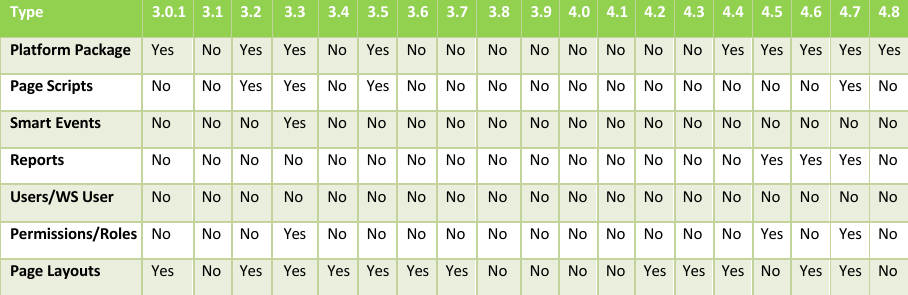
System Changes from Release to Release – Summary
Collections Release V4.7
RELEASE NOTES
New features:
A new option to manually send mass emails has been added with the 4.7 release. Using this Mass Email Workbench tool, users will have the ability to manually mass email Dunning and Statements for their customers. A user will have the option to select the invoice(s) to email/print from a list generated for the selected Entity. When emailing, the user can select the template, sender, and receiver(s) of the emails. There are many filter options that allow the selection of a large number of invoices to email or print. When printing, a zip file is downloaded containing a PDF version of the selected invoices. When emailing, if Dunning is selected, the option to attach a copy of the Invoice PDF is available. Lastly, a log has been added to allow the user to view all emails that have been generated by the feature. To access this feature, the user would navigate to Applications>Collections>Mass Email. The Mass Email page will display a log for all manually sent emails, as well as a button named Mass Email Workbench where the user can send new mass emails. A new option was added to allow for User-Defined Aging Buckets in the AR Aging Workbench. A user can utilize this feature to define the time frames they wish to view their aging in the AR Aging Workbench. This option can be accessed by navigating to Applications>Collections>Collections Admin Configuration>AR Aging Configs.
Before the version 4.7 release, users were limited to the filter ability when using the AR Aging Workbench. Now, by selecting the magnifying glass on the Customer bar, a user is given the options of Contains, Does Not Contain, Starts With, Ends With, Equals, and Does Not Equal. This allows users the ability to filter by a range of different customers. To access the AR Aging Workbench, a user would navigate to Applications>Collections>AR Aging Workbench. Note: You will need to access this feature from the entity level.
In addition to the above changes around filtering, the balance of each aging bucket is also updated when filters are used. Now, if a user decides to filter out certain customers, the balances in each bucket will reflect that change as well.
Collections Release V4.6
RELEASE NOTES
New features:
With the version 4.6 release, Collections users will now be able to include Invoice PDF attachments in their Dunning Emails. This feature can be enabled in Tab 6 – Entities of the Collections Admin Configuration. By selecting “Attach Invoice PDFs”, the Dunning Notice emails will now contain the Invoice attachment. Depending on where the Invoice was created (in Order Entry or directly in Accounts Receivable Invoices), the correct Invoice PDF will be selected. If the Invoice was originally created in Order Entry, the OE Invoice PDF will be attached. If the Invoice was generated in AR Invoices originally, the AR Invoice PDF will be attached. This feature can be enabled and disabled by entity.
A new “Summary Note Report” has been added to the AR Aging Workbench’s CNS Reports list. This is an interactive report that will allow a collections user to see all the notes entered for a given case. The report contains the following columns: Note ID, Case, Name, Customer Name, Subject, Type, Description, and AR Invoices. This report can be filtered by each column to show the latest reports entered. The Note ID is a clickable link that will take you directly to the Collections note. A user will have the ability to export the report to a CSV.
A new “Last Note” has been added to the AR Aging Workbench’s CNS Reports list. This report lists all cases and customers and shows the last note entered. This can be used to allow a user to see the last note logged against a customer or case. Additionally, customers who have not had a note entered will show on the list to inform Collections Users which customers require activity. The report contains the Name, Customer, Case, Case Stage, Days Past Due, Oldest Due Date, Outstanding Balance, Note ID, Date, Type, Subject, AR Invoices, and Description columns. Collections Users will have the ability to export this report to CSV. Additionally, the Customer Name and ID, Case Number, and Note ID are all interactive links that will take a user to that record.
New Default templates have been added to accommodate customers in the United Kingdom. These templates can be used for dunning and statements, or as templates to build customer-specific templates. The following default templates will be included: UK – Correspondence Thank You, UK – Final Demand, UK – Standard Courtesy Notice, and UK – Standard Past Due Notice.
New Default templates have been added for the Promise to Pay process. In 4.5, the feature to send Promise to Pay emails was released. There will now be Standard Promise to Pay Notice – Due Soon and Standard Promise to Pay Notice – Past Due Default templates that users can send to customers or utilize when building their own customer templates.
With the updates to the Collections module and the additions of the AR Aging Workbench, some performance improvements were required to increase processing and page generation. Processing of the Collections module will now be split into microservices. Additionally, the module will utilize multithreading and multi-instances.
There have been issues of the Collections module process schedule coinciding with the Core Friday releases. This required the Collections module to be adjusted to maintain statement and dunning run time during these instances. In the past, if the collections process coincided with core releases, the DN Service and Statements Service would not run on that day. This led to statements not being sent out. With the new architecture, we are now isolating each step in the process. Moving forward, if the processing fails on one specific node (microservice) only that node will be reprocessed. All other nodes are not affected and will run as expected.
Collections Release V4.5
RELEASE NOTES
New features:
Within the Collections Module, a new AR Aging Workbench has been added. From the AR Workbench, a user will be able to view their aging by customer, different time frames (1-30 days, 60-90 days, over 90 days), customer type, and risk rating. The Aging Workbench will show any tasks due and notes against a customer, as well as include the ability to add new tasks and notes. Users will also be able to drill down to customer details, view all AR details (open/closed invoices, adjustments, overpayments, and advances), and see the customer's contact information. Lastly, a user will be able to navigate directly to the customer record or case from the AR Aging Workbench.
A Collections Report Quick Link within the AR Aging Workbench has been added. This link will contain multiple reports associated with the Collections Process. New reports will be added in the future using this quick link. With the 4.5 release, two reports have been added to this feature. Two reports have been added: a Promise to Pay Report that allows a user to see all their Promise to Pays that exist within the Collections module. A user will be able to filter/sort by customer, dates, invoice, case number, promise to pay amount, outstanding balance, and invoice balance. Additionally, an AR Forecast report has been added that will allow users to see AR balances due by customers as well as Promise to Pay balances that are due. Users can sort and filter the period of time to see the balances due and be given a total as well as a percentage expected to receive.
A new Promise to Pay Email Template has been added to the Collections Module that will allow an email to be sent out before or after a promise to pay expiration. This will go to the customer associated with the promise to pay as well as the CC configured in the Collections Admin Configuration.
The Collections module now provides status on emails sent to customers. A new column named “Delivery Status” has been added to the Emails and Case component of the Collections Module. The Delivery Status will let the user know if an email (Dunning Notice, Statement, Promise to Pay) has been delivered, opened, or if there was an error. Additionally, a column called “Email Status Details” will provide feedback if an error occurs.
A new section has been added called Training Material. In this section, a user will be able to download the most up-to-date User Guide for Collections. Additionally, a link will be provided that will take users to the Collections Training Playlist that contains numerous how-to and training videos on how to use the Collections Module.
Within the Entities Tab of the Collection Admin Configuration, a new setting has been added named Statements by Entity. This setting gives users the ability to send out Statements on a per-entity basis. By default, this setting is off, which sends a statement to customers for all invoices regardless of the entity. When checked, Customers will receive a statement for each entity they have invoices. If this setting is checked for one entity, it will need to be checked for all entities you wish to receive statements. If it is checked in one entity and unchecked in another, the unchecked entity will not receive statements.
Within the Collections Tab of the Customer Record and Invoice, a Promise to Pay Amount field has been added. Using this field, a user will be able to specify how much has been promised to be paid by a customer. When a Promise to Pay date is entered, this amount field is required. This field is utilized by the Custom Reports in the AR Aging Workbench.
The Testing feature has been renamed to Test Mode. The user will now navigate to Collections>Test Mode to enable or disable Whitelisted emails for testing.
Removed the time limit on Statements being sent out each month. A user can now send multiple statements to customers within a month. Before the release, statements to a customer could not be sent more than once within 20 days.
Do not Clone Field: This option will prevent users from inheriting the relationships of the old transaction to the newly created transaction when a duplicate action is done. This prevents the relationships on a transaction from being inherited on the new one when a user duplicates (or clones) AR Invoice, Entities, or any other transactions.
Retry Mechanism: After each Quarterly Release or Code Push into Production from Core Intacct, the Intacct API calls go down (offline). In the case where Dunning or Statement services are running during this outage, the flow will be interrupted, causing the DNS or Statements to not be sent. A retry mechanism has been added that will check for unsent Statements and Dunning Notices for the next three days after Quarterly Release and will send them.
Collections Release V4.4
RELEASE NOTES
New features:
Additional Message Fields in the Remittance Tab of the Collections Admin Configuration screen: a section has been added named ‘Extra Messages’ with three new merge fields (Remittance Message 1, Remittance Message 2, Remittance Message 3). These fields allow for text to be added in the email body message via the template editor and differ by entity.
Within the Entities tab of the Collections Admin Configuration screen, the option has been added to choose a specific date format (Ex., MM/DD/YY, YYYY/MM/DD, DD MMM YYY) for standard fields in the email body message (Ex: DateDue, InvoiceDate). Date formats are entity-specific and are chosen from the new Date Format drop-down field.
An updated version of the template editor has been added in 4.4. The updated editor improves the user experience by providing several formatting options as well as:
Allows the paste from Word functionality while maintaining formatting
Ability to insert URL and email links with text and tooltips
Ability to insert an image URL or paste in the message body
Paste HTML format in the message body
Ability to preview the template before saving
Increased the width of the Template editor when creating a manual email. This allows more space to view and edit the message, as well as aligns all options into two rows.
Merge fields can now be added to the subject line of any email and email template.
Collections Release V4.3
RELEASE NOTES
New features/Bug fixes:
Added the ability to create a Threshold amount for Dunning Notices. The Threshold field can be found within the ‘Message Filters’ tab of the Collections Admin Configuration page. A user can specify a currency threshold for a specific entity, which will keep Dunning Notices from being sent to customers below this value.
A tooltip was added for 'Update Cases with Payment Info' on the Collections Admin Configuration Page, which states, "This option will interrupt attaching AR Payments on Collections Cases. This is used if you want to speed up the process in this company by ignoring the Payments for Collections process."
Added the option to 'Disable Statements' at Customer header level. A user can now disable Statements for a customer at the top level by navigating to the Collections tab within the Customer record.
The system was incorrectly creating and sending Statements when the “Disable Statements” checkbox was set to True at the Customer level.
The Collections module was including invoices in statements from entities that did not have the Collections Module enabled.
Users were not able to disable Dunning Notices for a specific Entity. A user would attempt to disable Dunning Notices for an Entity from Collections Admin Configuration and save, but when returning to the configuration screen, the entity remained enabled. The result was the same when attempting this at both the Top and Entity Level.
Collections Release V4.2
RELEASE NOTES
New features/Bug fixes:
Added support for dunning notice suppression based on a per-entity configurable threshold for outstanding invoice amounts.
The system was incorrectly suppressing Statement emails when a Promise to Pay date was set on the Customer record.
The system was incorrectly displaying an error message when updating the Customer stage to Promise to Pay – although the underlying operation is successful.
Collections Release V4.1
RELEASE NOTES
New features/Bug fixes:
Application optimization to reduce the number of API calls to Intacct during invoice and Collections Case processing.
Users are unable to save updates to the Entity configuration on Collections General Configuration Tab 6 when Entities have been deleted or inactivated in the company.
The 'On Hold' selection for setting the Stage on a Customer was missing from the dropdown list.
New invoices attached to a Case in the 'Disputed' stage are incorrectly set to the 'Disputed' stage.
Collections Release V4.0
RELEASE NOTES
New features/Bug fixes:
Application fails to send dunning emails for Customer records with the ‘Dunning Delivery Preference’ field set to ‘Other Contact [Dunning].’
Application fails to consolidate and include only the oldest due invoice information into a single dunning message when the dunning preference is set to ‘Consolidated – Based on Oldest Due’. Instead, the system defaults to ‘Per Invoice’ dunning behavior.
Collections Release V3.9
RELEASE NOTES
New features/Bug fixes:
Application fails to restart sending dunning emails after the promise-to-pay date set at the Customer record has expired.
Collections Release V3.8
RELEASE NOTES
New features/Bug fixes:
Dunning emails fail with "Error on preparing the email for SendGrid."
Filter TO/CC/BCC address fields to eliminate duplicate addresses before sending email dispatch requests to SendGrid.
Collections Release V3.7
RELEASE NOTES
New features/Bug fixes:
When the Delivery Preference is set to Transaction Bill to Contact, the application incorrectly sends messages to a given contact that list all invoices eligible for dunning, and not just those invoices for which the contact is indeed the Bill to Contact.
The application must not apply case sensitivity to email entries in the Testing Emails Whitelisted when determining whether a message recipient is on the list.
The application is incorrectly resetting the “Disable Dunning Notice” checkbox to FALSE at the Customer record level when one or both of ACH or Credit Card on File is set to TRUE.
Postfix the Type ID entries in the Customer Type dropdown selection list of the template editor with “Private” as a signal to the user to ensure the Type ID is accessible to the entity being configured.
The templates table in Collections Admin Config is missing the header label for the country column.
Collections Release V3.6
RELEASE NOTES
New features/Bug fixes:
Allow the configuration of From/Reply-To dunning message fields on a per-Entity or global basis, including the option to populate these fields with the Collections analyst assigned to a Case.
Add new merge fields {!collections_analyst_from_customer!} and {!collections_analyst_from_case!} for use in dunning template composition.
Incomplete error handling causes the application to incorrectly ignore an enabled Testing Emails whitelist during testing.
Collections Release V3.5
RELEASE NOTES
New features/Bug fixes:
Manually created email messages show an empty message type field, which must be one of ‘Dunning Notice’, ‘Statement ’ or ‘Other.’
Remove the option to place the “Customer on Hold” on the screen that allows the manual update of the Customer stage.
The "Reason" field of the case object must show “Reversed Invoice” when this is the reason for case cancellation.
When Customer Type dunning is set to ON for an Entity, the system must show an error message upon saving the default country and language settings if no untyped templates are defined for the selected country and language combination.
Statement messages are incorrectly showing information related to reversed advances, fully applied advances, reversed overpayments, full payments, and partial payments.
A duplicated template does not have the Due Days field incremented by one when the parent template has a Due Days field value of zero.
The system must support a Customer ID merge field for use in template composition.
The application workflow for manually sending a statement message incorrectly reports the error “The case does not have any invoices with total due > 0” when there are due invoices.
Collections Release V3.4
RELEASE NOTES
New features/Bug fixes:
Extend message template selection criteria to include Intacct Customer Types (feature can be enabled/disabled on a per-entity basis).
Allow the user to define and designate, on a per-entity basis, the country and language of a default template set.
Support setup of the following information on a per-entity basis and make available as merge fields for use in template creation (thereby reducing template proliferation):
ACH and Remit-To banking
Information Message header and footer logo image
Allow the user to easily duplicate message templates to ease the template configuration task.
Correct merge fields table header text and allow the user to edit/delete merge fields while editing an existing template.
Allow manually sending statements and dunning notices using the manual email workflow even if the global Enable Statements option is disabled in General Admin Configuration.
Allow manually sending statement and dunning notices to multiple email recipients using the manual workflow.
The field label text and field value for “Statement Delivery Preference” is incorrect on the Customer Details section of the Statement details view a Statement is selected from the Case view.
Correct the template selection behavior within the workflow for manually sending an e-mail.
The Secondary stage is not being updated with the message template name.
The customer selection search box does not function as expected in the workflow for manually sending a message – this can result in immediately sending the e-mail.
An invoice appearing in a Case is referencing the wrong Customer.
The application is incorrectly allowing a duplicate template to be saved.
The invoice rating is incorrectly calculated for partially paid invoices.
Reversal of the only outstanding Case invoice is not resulting in Case closure.
The Case and invoice stage fields are not being correctly updated when the Customer stage is updated via the Manage Collections workflow.
Reversed overpayments are not being shown in the AR Overpayments section of the Case view.
Improvements and fixes are needed for several user interface issues that degrade the user experience for composing and sending manual emails.
Template creation workflow fails to validate the mandatory Stage attribute.
Improvements and fixes are needed for several user interface issues that degrade the user experience for composing message templates.
The stage attribute of Disputed invoices is incorrectly being updated when dunning messages are sent.
The application is failing to accurately update the Delivery Preference attribute of stored dunning messages.
Case creation generally fails for single-entity companies.
The application incorrectly includes invoices marked as promise-to-pay in dunning messages.
AR adjustments are not being processed and added to Cases.
The application is failing to set the stage of newly created cases to reflect a pre-existing Customer stage setting of “on hold”, “suspended,” or “suspension approved.”
The application is not honoring the setting of the Customer stage to “Collection Suspended” – ongoing dunning message dispatch results in incorrect updates to the Case stage.
The application is incorrectly setting the stage of newly created invoices to “disputed” when the Customer stage was previously set to “disputed.”
The application is failing to update the Case and invoice stage to “Payment Received” when full payment is applied to the invoice.
Collections Release V3.3
RELEASE NOTES
New features/Bug fixes:
A critical bug fix release addressing the following key areas of application functionality:
the correctness of Collections Case information
the correctness and predictability of dispatch of dunning notices and statements
the correctness and readability of Statement type messages
The application does not correctly process advance payments and reversed transactions.
The application incorrectly re-opens multiple closed Cases upon payment reversal for invoices spanning both Cases rather than adding the affected invoices to a single re-opened case.
Updating an invoice collections stage using the Manage Collections workflow is failing.
The Manage Collections workflow is failing to correctly set the On Hold stage attribute of Customer records.
User Interface messages shown to the user when using the Manage Collections workflow are unclear.
Critical fix for missing transaction types, information field values, and inaccurate amounts and invoice due dates being displayed on Statement type messages.
The application is incorrectly showing invoices in the draft state on Statement messages.
The application needs to send dunning messages and statements to all email addresses entered into the Secondary Email Address field of the Customer record.
Attachments to manually created email messages are not visible when those records are accessed from the Case view.
Critical fixes are needed to the workflow and message formatting for manual email dispatch.
The application is failing to correctly update the Case stage after changing the Customer level or invoice level stage setting via the Manage Collections workflow.
An unexpected error message is being displayed when the user attempts to disable dunning notices at the invoice level.
The application introduces duplicate or incorrect entries into the Customer field of created Approval and Notes.
The application is incorrectly creating duplicates in the Assigned-To field of newly created Task records and fails to validate for missing mandatory field values.
Collections Release V3.2
RELEASE NOTES
New features/Bug fixes:
Document reference numbers are added to the tables printed on dunning notices and statements.
Miscellaneous improvements to the text labels used throughout the application’s user interface.
The language attribute set at the Customer record is not correctly processed, failing to send dunning notices.
The invoice table shown in the Manage Collections workflow must be extended to include transaction date and invoice stage and table header labels improved for clarity.
The user is losing all edits made to templates when a mouse click event happens outside the Edit and New Template screens of the application.
Validation of merge field creation must check for illegal whitespace characters.
The application’s mass update function is incorrectly allowing the user to manually change the Status field of dunning notice records.
The invoice rating column must be removed from the invoice tables printed on dunning notices - it is inappropriate to show it on dunning messages.
The application does not show transaction currency amounts in the invoice tables printed to dunning messages.
The validation of the From date field value incorrectly prevents saving of updates to other fields of the Customer record by forcing the user to set this date to be the current or a future date.
The application does not allow the user to enter text into the URL textbox for the Insert Image functionality of the message template editor.
The user is unable to make invoice selections that span more than one page of a multi-page invoice listing of the New Email workflow.
Invoice edits are not producing correct updates to invoice record numbers in the Case view of the application.
The system is incorrectly sending dunning notices for invoices with zero and negative outstanding amounts.
Dunning notices are being incorrectly sent for Entities that are disabled in the Collections Admin Configuration screen of the application.
Dunning notices are being incorrectly sent despite the presence of an ‘Inactivated’ Application Enablement record.
The application sporadically sends dunning messages to contacts associated with other Customer records.
The application sporadically displays dunning notice records in the Collections tab of the wrong invoice record.
Merge fields are sporadically failing to show on dunning messages.
Collections Release V3.1
RELEASE NOTES
New features/Bug fixes:
Source code improvements to improve database access performance.
The application was updated to initiate network connections using the stronger encryption of Transport Layer Security (TLS) 1.2 or higher.
The application fails to save the “Delivery at End of Month” checkbox state when it is set to TRUE.
The application incorrectly allows the creation of Collections Cases at the top level.
The application incorrectly resets the Disable Dunning Notices checkbox of the Customer record to FALSE when previously set to TRUE by the user.
Collections Release V3.0.1
RELEASE NOTES
New features/Bug fixes:
The application fails to set a new Case status to “Assigned” when an analyst contact is configured at the Customer record level.
The application sporadically fails to save the Collections Admin Config settings for an Intacct company, or settings are sporadically being corrupted by the settings being saved for other companies.
Dunning notice dispatch is sporadically failing.
Merge fields are not being displayed on dunning messages.
The application is sending dunning notices to both Transaction Bill To and Ship To contacts when the preference is set to Transaction Bill To contact.
The application is incorrectly sending messages to email contacts not listed in the active Testing Emails Whitelisted record.
Dunning messages are being incorrectly sent for invoices during an active promise to pay time period.
The system sets the Case stage to Disputed when an invoice of a previously closed case is reversed, and that invoice is associated with the existing open Case.